
Process mapping for automation means writing down, step by step, how a piece of work moves through your business before anyone builds software to do it. It sounds like paperwork. It is the cheapest insurance you can buy against an automation that does the wrong thing quickly. A map shows you where the work starts, who touches it, which systems hold the data and where the exceptions hide. This guide walks through a method a founder or operations lead can run with a whiteboard, a spreadsheet and two or three people who do the work.
Why process mapping for automation comes first
When people describe a process from memory, they describe the happy path. “The enquiry comes in, we send a quote, they pay, we book the job.” What they leave out are the branches: the customer who wants a site visit first, the quote that needs the owner’s sign-off above a certain value, the payment that arrives by bank transfer with no reference. An automation built from the happy path breaks on the first exception, and someone ends up fixing it by hand while the system keeps sending messages.
A map also settles arguments. Two team members often do the same task in different ways. Putting both versions on paper lets you agree one way before you automate it.
Step 1: pick one process and set its edges
Choose a single process and write two sentences: what starts it and what finishes it. “Starts when a customer submits the booking form. Ends when the job appears in the technician’s calendar and the customer has a confirmation.” Clear edges stop the map from sprawling into the whole business.
Name an owner for the process. This is the person who will decide what happens when the rules are unclear, and who will be told when the automation fails later.
Step 2: walk through a real example
Take a recent, real case and follow it from start to finish. Ask the person who handled it to show you the actual screens, emails and messages. Do not work from how it “should” go.
For each step, write one line in a spreadsheet with these columns:
- Step number and a short verb-first description, such as “Copy enquiry into CRM”
- Who does it (a role, not a name)
- Which tool or document it happens in
- What information goes in and what comes out
- Roughly how long it takes
- What triggers the next step
Then repeat with two or three more real cases. Different cases surface different branches.
Step 3: draw the process map for automation
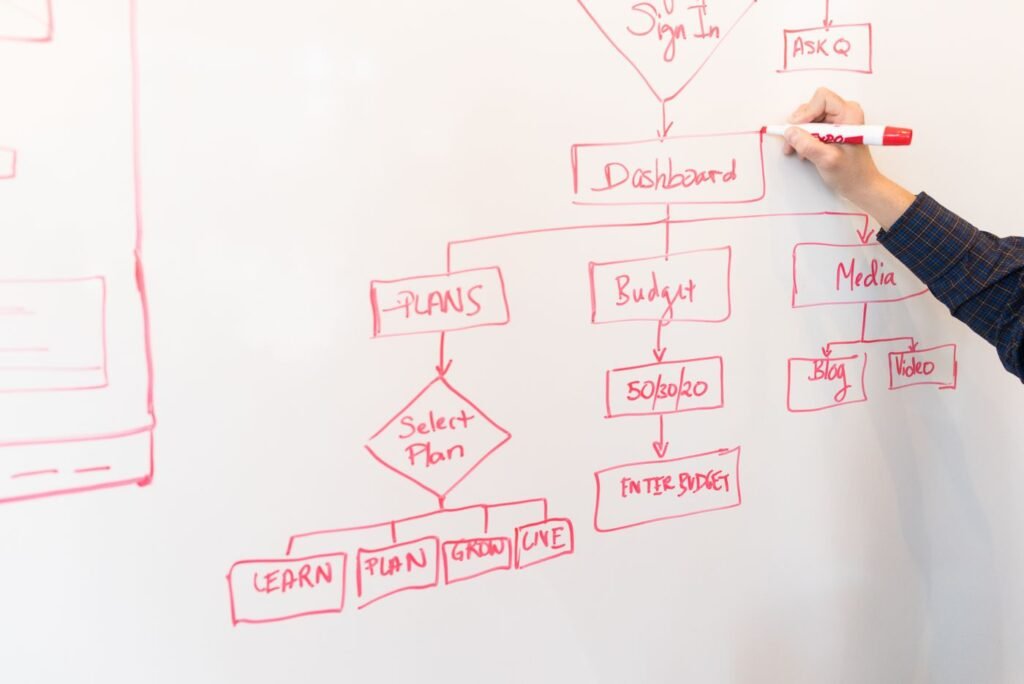
Turn the spreadsheet into a simple flow. Boxes for steps, diamonds for decisions, arrows for the order. Swimlanes help: one horizontal lane per role or system, so you can see each time the work changes hands. You can do this on a whiteboard, in a free diagram tool or on paper. The format matters far less than getting every step and decision down.
Say a Hyderabad physiotherapy clinic maps its new-patient booking. The drawing shows six handoffs between the front desk, the WhatsApp inbox, the booking calendar and a paper intake form. Two of those handoffs involve retyping the patient’s name and phone number. That retyping is where errors creep in, and it is the first thing worth automating.
Step 4: mark the exceptions and the rules
At every decision diamond, write the rule in plain words. “If the quote is above ₹50,000, the owner approves it.” “If the customer has not paid within three days, send a reminder.” If the team cannot agree on a rule, mark it in red. Red marks are decisions for the owner to make, and they must be settled before anything is built.
List the exceptions separately. For each one, decide whether the automation should handle it, hand it to a person, or stop and alert someone. An automation that knows when to stop is far safer than one that guesses.
Step 5: tag each step
Go through the map and tag every step with one of four labels:
- Automate: repetitive, rule-based, data already in a system.
- Assist: a person decides, but software can prepare the information or draft the message.
- Keep manual: needs judgement or a personal touch.
- Remove: the step exists only because of an old workaround and adds nothing.
The fourth label is often the most valuable. Mapping regularly turns up steps that nobody needs, such as a spreadsheet that duplicates the CRM or an approval that no one checks. Removing them costs nothing and makes the eventual automation simpler.
Step 6: write the specification
For the steps tagged “automate”, write a short specification: the trigger, the data needed, the actions, the expected result, what happens on failure, and who gets alerted. One page is usually enough for a small process. This is the document you hand to whoever builds it, whether that is someone on your team or an outside partner.
Include a test plan: three or four real cases, including at least one exception, that the automation must handle correctly before it goes live.
Common mapping mistakes
- Mapping in a meeting room without the people who do the work.
- Drawing the process as it should be rather than as it is.
- Going too detailed too early. Start with 10 to 20 steps and add detail only where a step is unclear.
- Skipping the failure path. Every automated step needs an answer to “what if this does not work?”
- Leaving the map in a drawer. Keep it next to the automation’s documentation and update it when the process changes.
Mapping pairs well with deciding what to automate in the first place: score your processes first, then map the winners. If you would like help running the exercise, our automation work starts with an audit of about two weeks that includes mapping your main processes. When the map shows the bigger issue is the order of work or who owns what, that is often a strategy question rather than a software one.
If you have a process that keeps going wrong, tell us about it on a short call.
Frequently asked questions
What tool should I use for process mapping?
Whatever your team will open. A whiteboard photo, a spreadsheet or a free diagram tool all work for a small business. What matters is that every step, decision and exception is written down and that the people who do the work agree it is accurate. Choose specialist modelling software only if you need to share maps across a large organisation.
How long does it take to map one process?
For a typical small business process with 10 to 30 steps, expect a couple of working sessions of an hour or two each, plus time to write it up and check it with the team. Processes with many exceptions or several departments take longer. Following real cases rather than describing the process from memory keeps the sessions focused.
What is the difference between a process map and an SOP?
A process map shows the flow: the steps, decisions, handoffs and systems involved, usually as a diagram. A standard operating procedure (SOP) is a written instruction for how to carry out the steps. The map helps you see where to automate or simplify. The SOP helps a person do the remaining manual steps the same way each time.